Key Takeaways
- VT Markets provides a multi-asset CFD trading app that allows traders to access forex pairs, global indices, energies, precious metals, soft commodities, shares, ETFs, bonds, and crypto.
- Core features include watchlists, multi-timeframe charts, one-tap trading, and two-factor authentication for security.
- Advanced tools include TradingView chart integration, economic calendar with alerts, trading central analysis, and technical indicators.
- VT Markets offers account options such as Cent, Standard STP, Raw ECN, Pro ECN, and Swap-Free accounts where available, giving traders greater flexibility based on their experience level and trading style.
- Flexible funding options include bank transfers, cards, e-wallets, mobile payments, and cryptocurrencies, with VT Wallet available as an optional tool.
- Operates under multi-jurisdictional regulation (FSCA, FSC, CMA as a Category 5 license) with segregated client funds and AML/KYC compliance.
CFD trading lets traders follow price movements across global markets without owning the underlying asset, and because markets move in lightning speed, the app behind those trades matters. Traders need one that supports clear execution, account control, market monitoring, and practical risk management.
VT Markets brings these functions together in a multi-asset CFD trading app designed for both beginners and active traders. This guide explains why VT Markets is the best CFD trading app, covering its market range, platform access, account options, app features, and tools for trading across different asset classes.
Multi-Asset CFD Trading from One App
VT Markets provides access to a broad range of CFD instruments within one trading environment. These include forex pairs, global indices, energies, precious metals, soft commodities, share CFDs, ETF CFDs, bond CFDs, and cryptocurrency CFDs.
This range allows traders to follow different market themes throughout the day. Currency pairs may move around central bank decisions, gold may react to inflation data, oil may respond to supply updates, indices may reflect broader market sentiment, and share CFDs may be influenced by earnings reports.
Through the VT Markets mobile app, traders can create watchlists, review charts, monitor open positions, manage account activity, and access trading tools while on the go. For added flexibility, the app also connects with MT4, MT5, WebTrader, and TradingView, giving traders more ways to analyse markets and manage CFD positions.
Benefits of Trading CFDs with VT Markets
The following points highlight the key benefits of using VT Markets for CFD trading.
1. Streamlined Trading from One Account
Many traders follow more than one market at a time, which can mean jumping between separate apps for charts, account details, and open positions. VT Markets brings these together in one account, so everything you need to monitor and trade stays in the same place.
Through the VT Markets app, traders can switch between markets, review account activity, and manage open positions from mobile. This supports a more efficient trading experience without needing to separate analysis, account management, and position monitoring across different tools.
2. Greater Flexibility Across Market Movements
CFDs allow traders to take long or short positions based on their market view. This means they can respond to both rising and falling prices without owning the underlying asset.
For example, a trader may open a long position when expecting an instrument to rise, or a short position when expecting it to fall. This flexibility can help traders adapt to changing market conditions, including trends, pullbacks, and periods of volatility.
3. Various Account Options
VT Markets offers different account types to support different trading needs, including Cent, Standard STP, Raw ECN, Pro ECN, and Swap-Free options where available. This allows traders to choose a setup that matches their experience level, trading style, and cost preferences.
Beginners may prefer smaller trade sizes, while more active traders may look for tighter spreads or conditions suited to higher trading frequency. Swap-Free options may also support traders who prefer to avoid overnight swap charges, subject to availability and terms.
4. Fast and Reliable Trade Execution
CFD markets can move quickly, especially during major economic events, earnings releases, central bank decisions, or periods of high volatility. In these conditions, execution speed and platform reliability become important.
VT Markets supports fast and reliable trade execution across its trading platforms, helping traders place orders, close trades, and adjust positions more efficiently during active market periods.
5. Regulated Trading Environment and Segregated Funds
Trust is an important factor when choosing a CFD trading app. VT Markets operates through regulated entities in multiple jurisdictions, including FSCA in South Africa, FSC in Mauritius, and CMA in the UAE under a Category 5 licence.
VT Markets maintains client funds in segregated accounts, meaning client funds are kept separate from company operational funds, subject to applicable regulations and entity-specific terms.
In addition, VT Markets applies AML and KYC procedures as part of its operating framework. Eligible clients may also have access to client fund insurance coverage of up to USD 1,000,000 per account, subject to the applicable policy terms, conditions, and exclusions.
Read more details on VT Markets’ regulatory framework: Is VT Markets a Regulated Broker?
Core Features of the VT Markets App
The VT Markets app is designed to support the daily workflow of CFD traders, from organising watchlists to reviewing charts, placing trades, and protecting account access. These features help traders manage market activity more efficiently from mobile.
Watchlist
The watchlist helps traders organise the CFD instruments they follow most closely. Traders can track selected instruments, compare price movement across asset classes, and stay focused on the markets most relevant to their strategy.
Beginners may start with a smaller list of familiar instruments, while active traders may create separate watchlists by asset class, market theme, or trading session.
How to use the watchlist on the VT Markets app:
1. Open the VT Markets app and navigate to the Markets.
2. Tap the Watchlist tab to view your existing watchlist or create a new one.
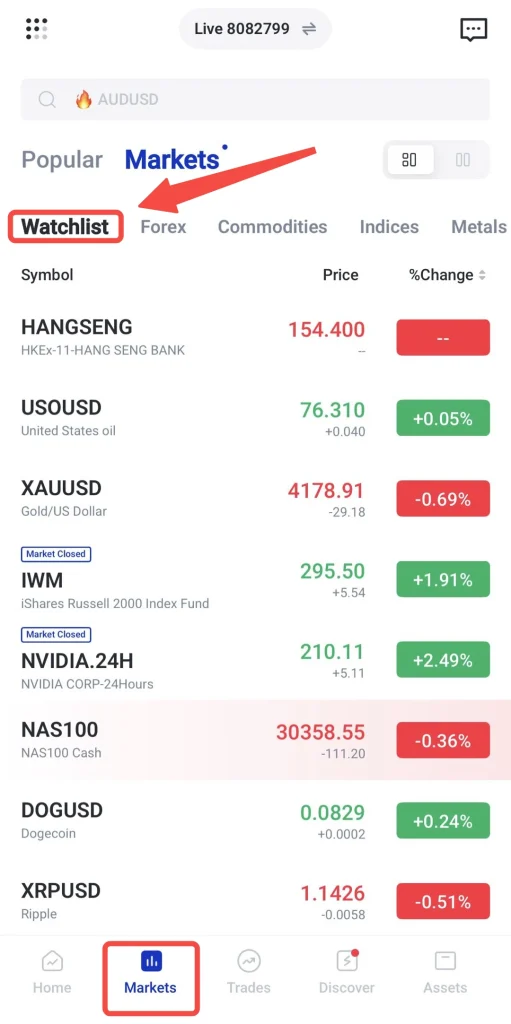
3. Search for the CFD instrument you want to follow, then tap the ⭐ icon.
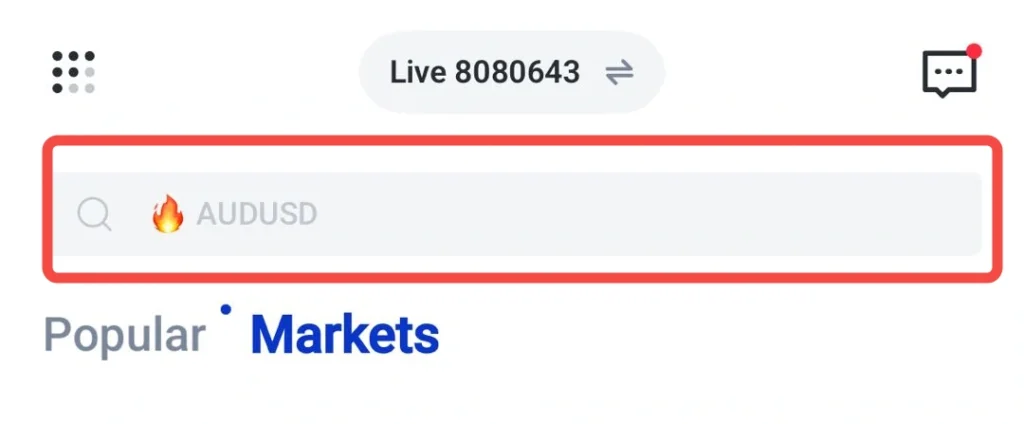
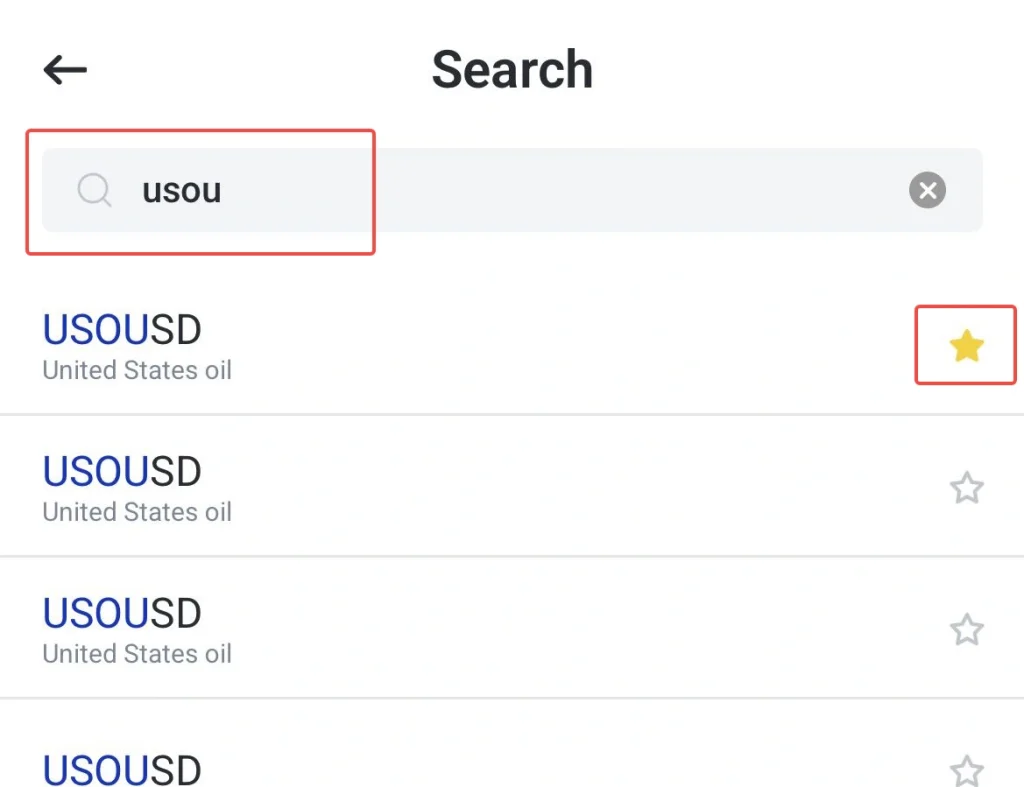
4. Rearrange instruments by priority, group them by asset class or market theme, and set price alerts for specific levels.
Multi-Timeframe Analysis
Multi-timeframe analysis allows traders to review the same CFD instrument across different chart intervals. A longer timeframe can provide context on the broader market direction, while a shorter timeframe can show recent price movement, volatility, and possible entry or exit areas.
This is useful for CFD traders because market conditions can look different depending on the timeframe being reviewed. For example, gold may show a broader upward trend on a daily chart but short-term volatility on a lower timeframe. By comparing multiple intervals, traders can build a more complete view before making trading decisions.
In the VT Markets app, traders can switch between available chart intervals, apply technical indicators, and review price action without leaving the chart screen.
How to use multi-timeframe analysis on the VT Markets app:
1. Select a CFD instrument and open the chart window.
2. Tap the timeframe menu to choose from the available chart intervals.
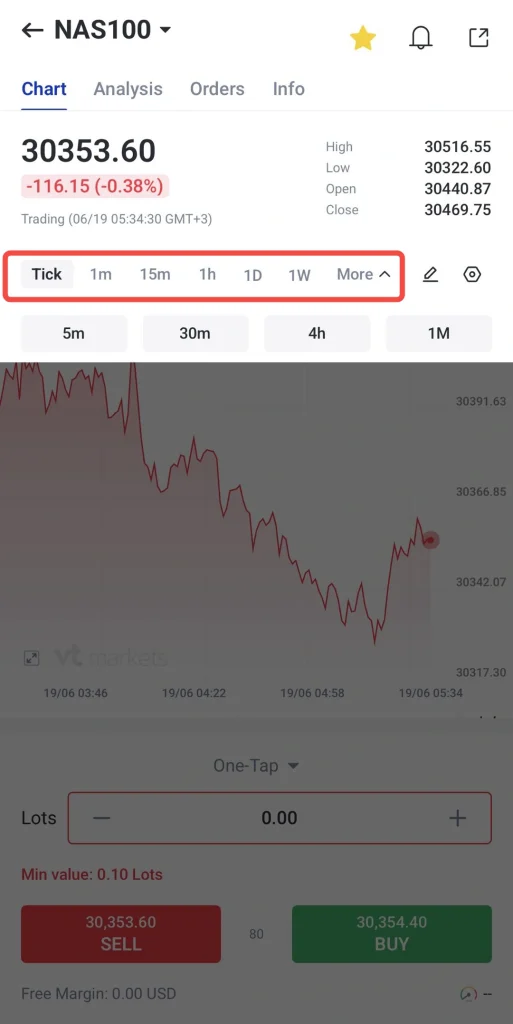
3. Apply technical indicators to support your analysis on different timeframes.
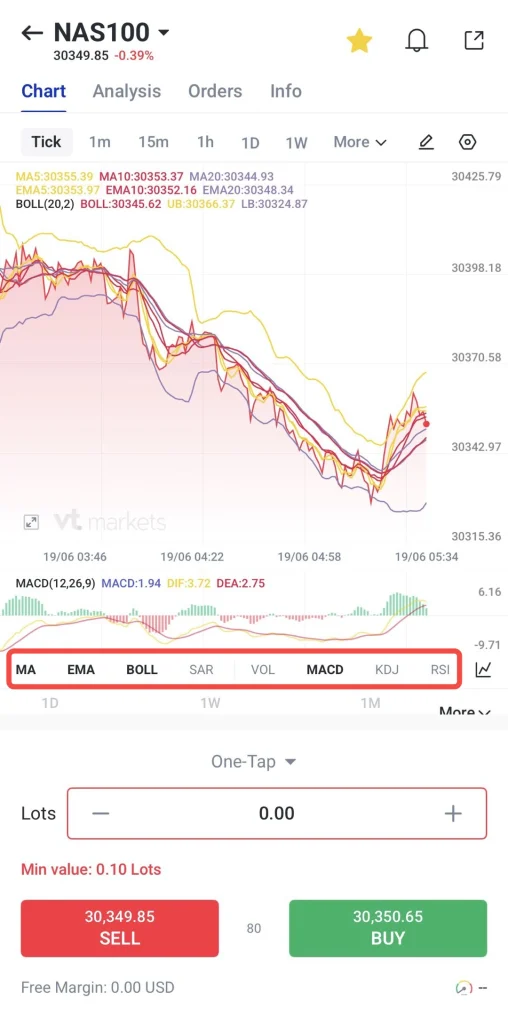
4. Switch between intervals to compare short-term price movement with the broader market view.
One-Tap Trading
One-tap trading is designed to make the order placement process more efficient. This can be useful in fast-moving CFD markets, where traders want to act without going through extra steps.
In the VT Markets app, traders can prepare key trade settings such as lot size, stop-loss, and take-profit before placing an order. This allows traders to respond more efficiently when they are ready to trade, while still reviewing their selected settings before confirming the order.
This feature may suit active traders who monitor instruments that can move sharply during busy sessions.
How to use one-tap trading on the VT Markets app:
1. Open the chart or watchlist for the CFD instrument you want to trade.
2. Navigate to the One-Tap button above the sell and buy options
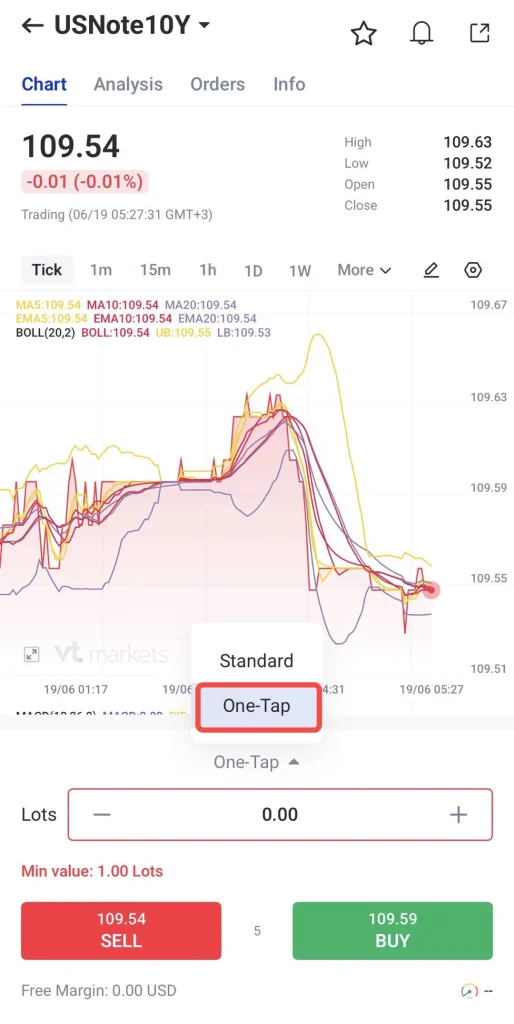
3. Click this button and adjust your chart setting, including ask price, bid price, take profit, stop loss, open position, indicators and others.
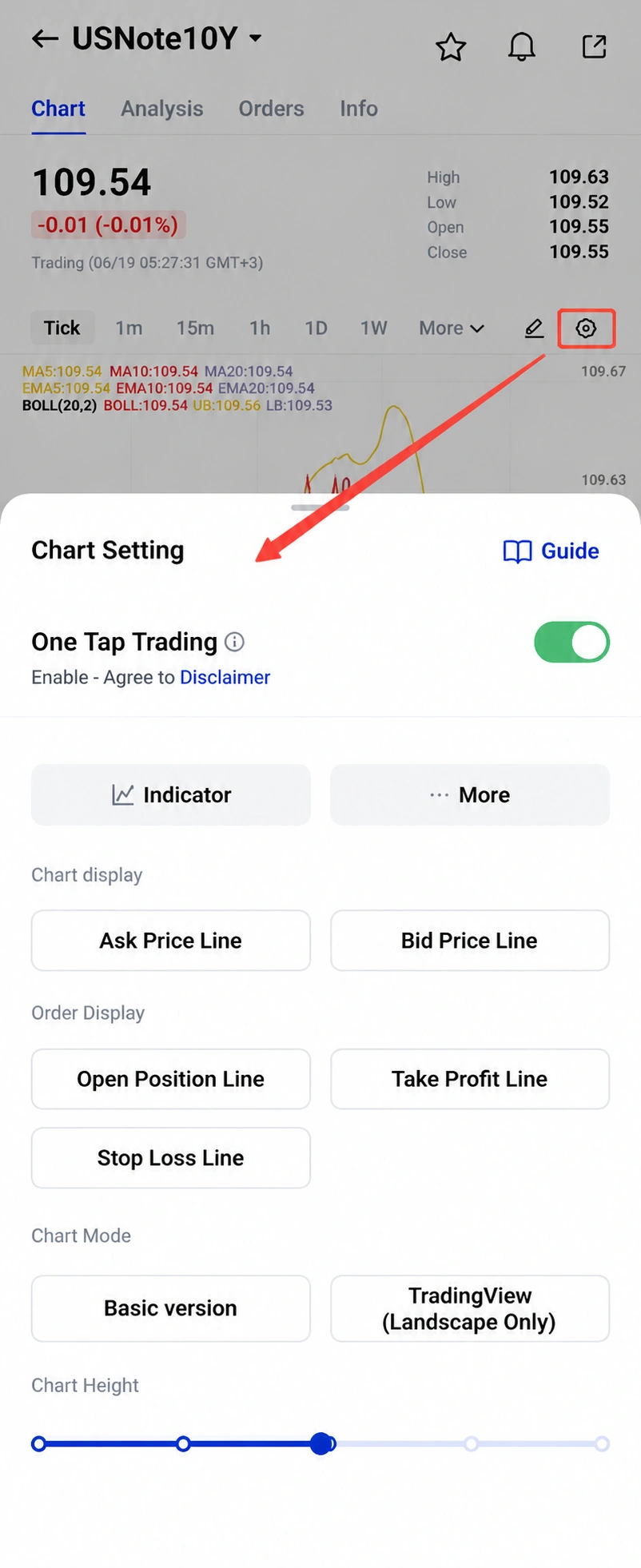
4. Review the chosen options and start trading.
5. You may also check this guide to understand the chart setting better.
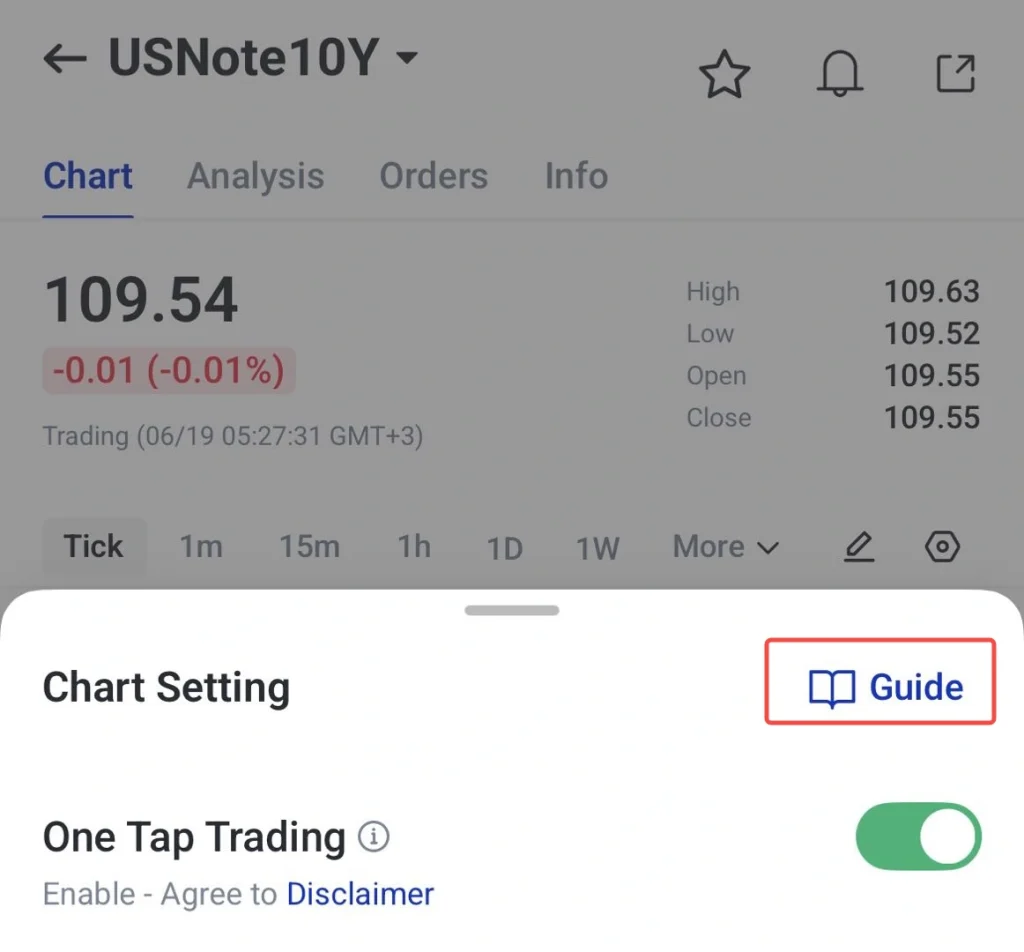
Note: Beginners may keep the One Tap trading options turned off to reduce the chance of accidental orders. More experienced traders may adjust their settings based on their trading preferences.
Two-Factor Authentication
Account security is an important part of the trading experience, especially for traders who manage positions, funding activity, and personal account information through a mobile app. Two-factor authentication adds an additional verification step beyond the account password.
This extra layer of protection helps reduce the risk of unauthorised access, even if login details are compromised. For CFD traders who access their account across mobile, desktop, or multiple trading platforms, 2FA supports safer account management and helps protect trading activity.
How to set up two-factor authentication on the VT Markets app:
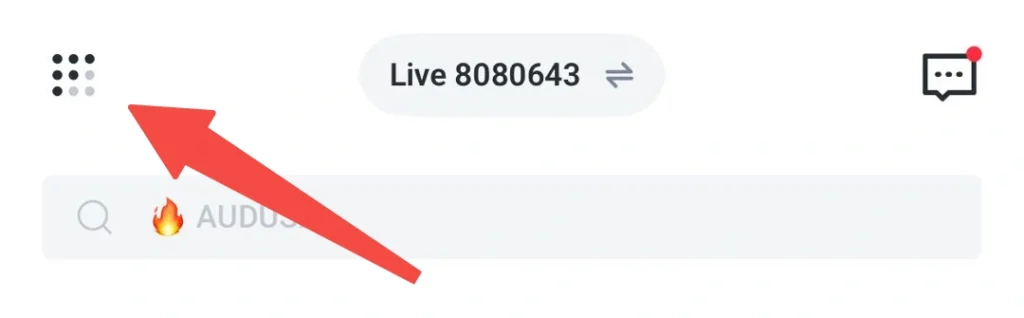
1. Open the dashboard and click this menu button.
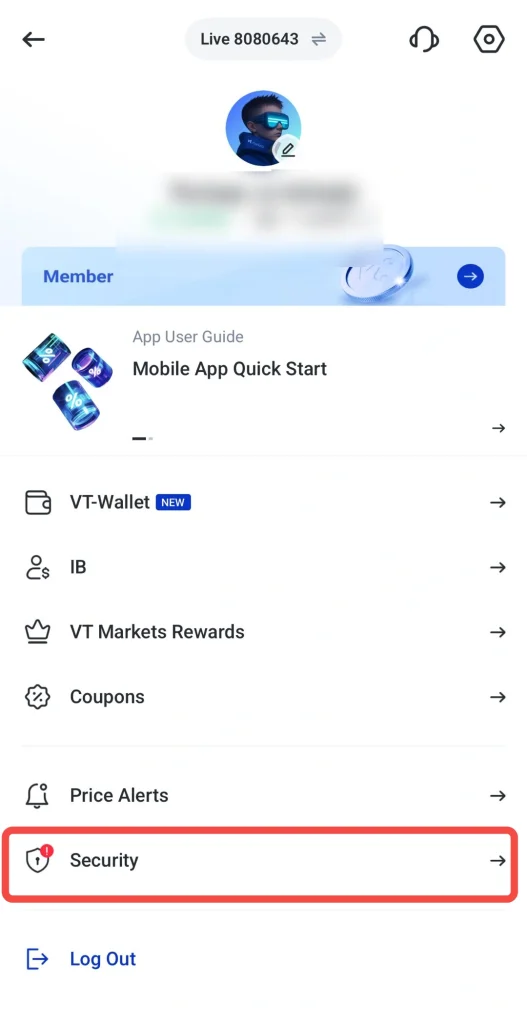
2. Select Security options
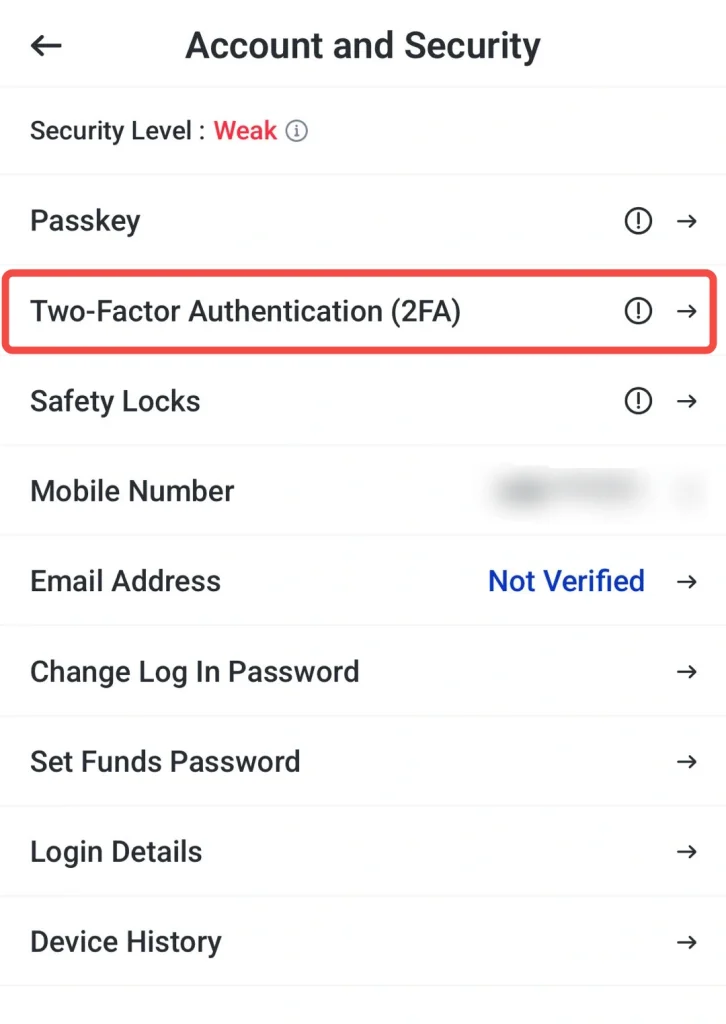
3. Click Two-Factor Authentication (2FA)
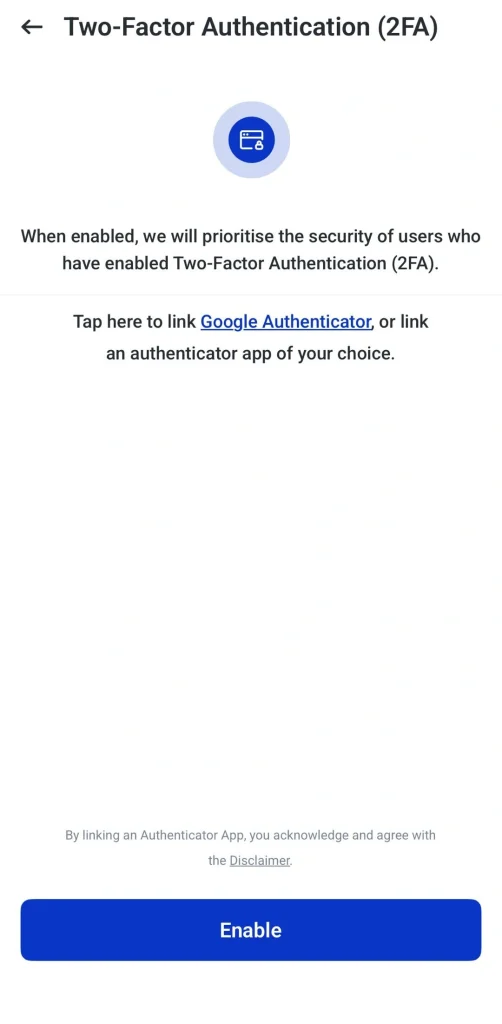
4. Click enable and follow the instructions to link it with Google Authenticator or other authenticator app of your choice.
5. Use the verification code provided whenever logging in or confirming sensitive actions.
Learn how to set up 2FA and manage security settings here: VT Markets App Security Settings Guide: 2FA, Passkey, Safety Locks, and Passwords
Advanced Trading Tools in the VT Markets App
Beyond core app features, VT Markets provides tools that support deeper CFD market analysis. These include advanced charting, economic event tracking, third-party market analysis, and technical indicators to help traders review opportunities before placing or managing trades.
TradingView Chart Integration
TradingView chart integration gives traders access to advanced charting functions directly within the VT Markets app. Traders can review CFD instruments using detailed chart layouts, drawing tools, indicators, and overlays without switching to a separate charting platform.
This means traders can apply the same charting workflow across any market they trade, marking support and resistance, studying trend direction, or reviewing volatility using one familiar set of tools.
How to use TradingView charts on the VT Markets app:
1. Select a CFD instrument and open the chart window.
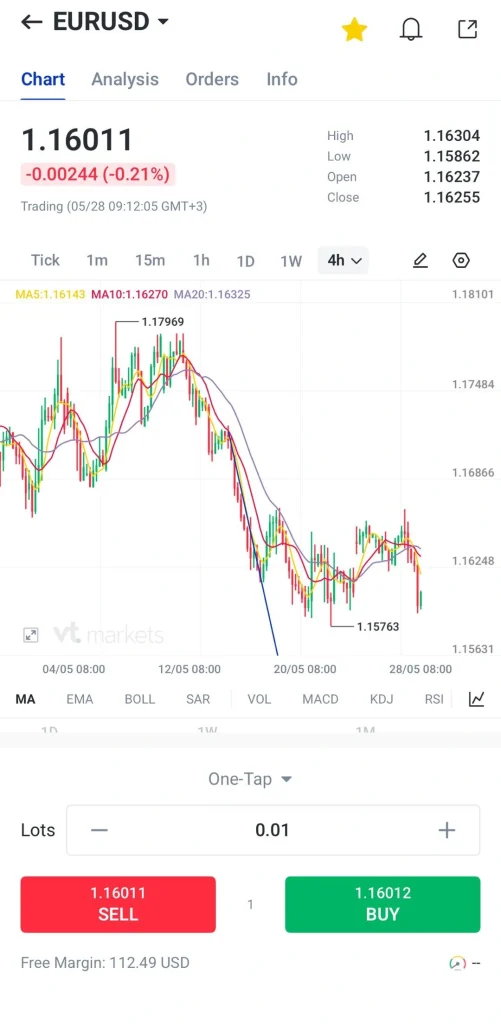
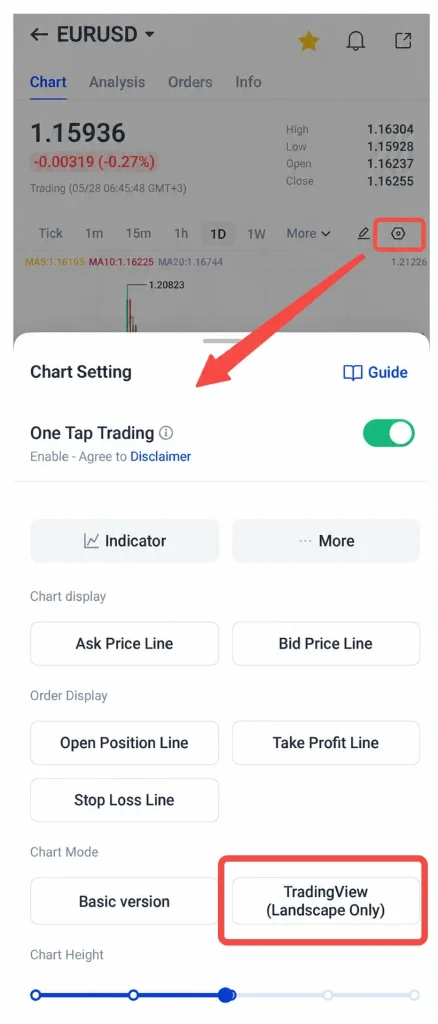
2. Click the button, tap the chart mode and choose TradingView.
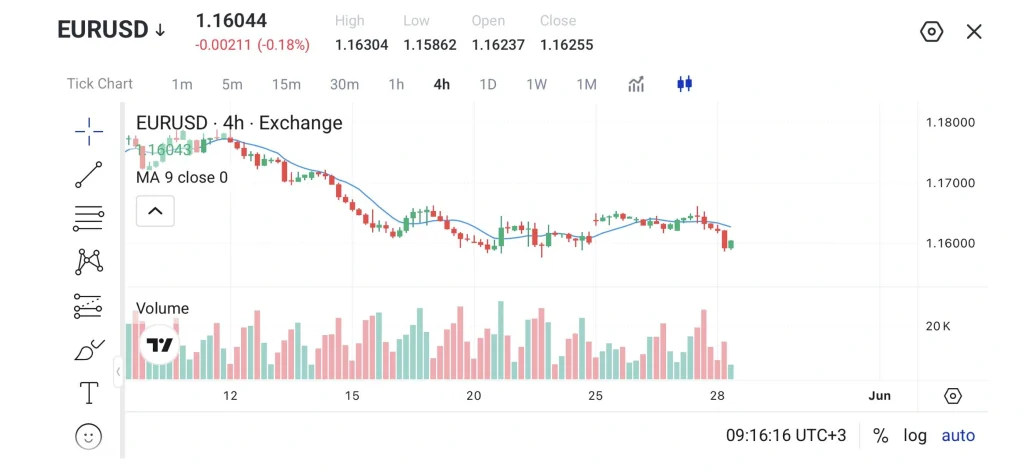
3. The layout will be landscape.
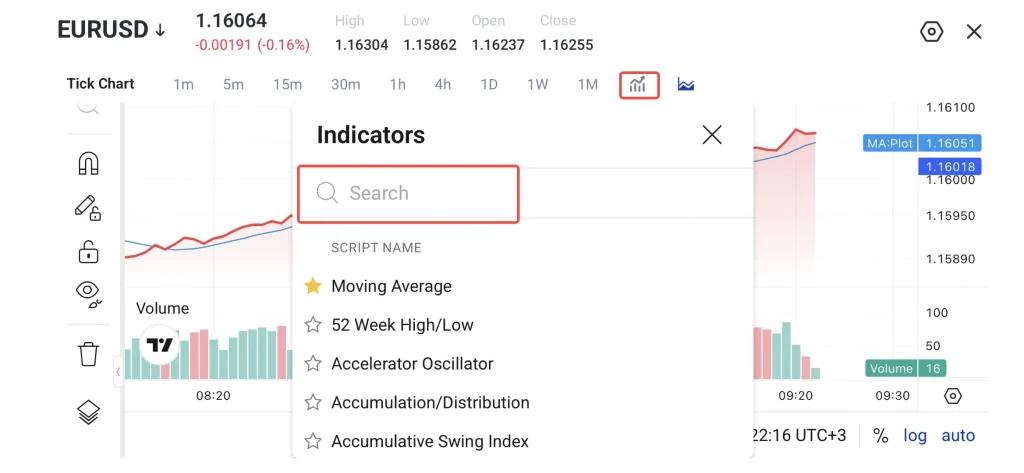
4. Add indicators such as RSI, MACD, Bollinger Bands, and moving averages.
5. Use drawing tools to annotate trendlines, support and resistance levels, and Fibonacci retracements.
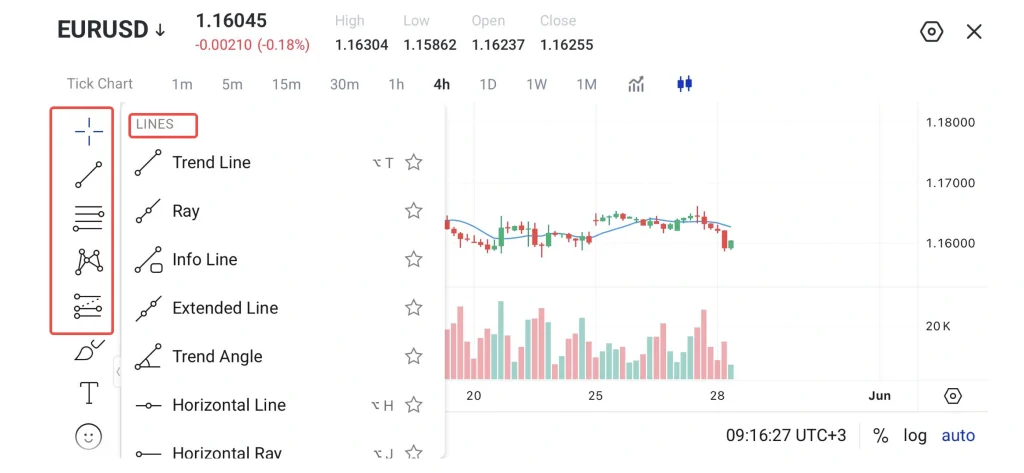
6. Switch back to portrait mode, then execute trades directly using One-Tap trading.
Economic Calendar and Alerts
Economic events affect each market differently. The same announcement might move one instrument sharply while barely touching another.
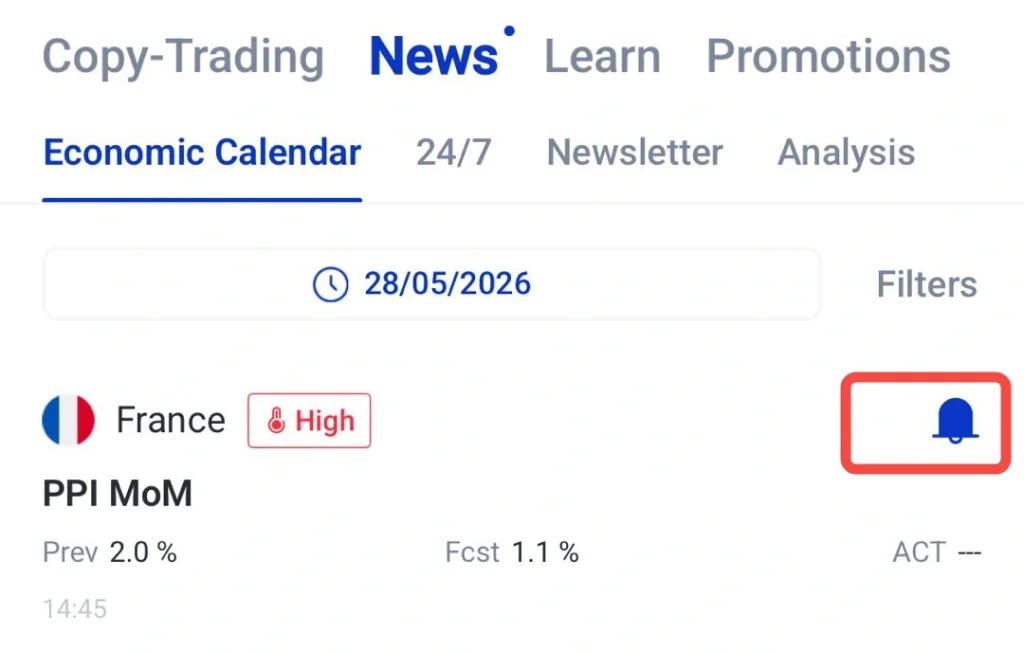
The VT Markets economic calendar helps traders track upcoming events by date, region, and impact level. Traders can also set alerts for important announcements, allowing them to prepare before key releases and review their exposure during more active market periods.
How to use the economic calendar on the VT Markets app:
1. Navigate to Discover → News → Economic Calendar.
2. Review upcoming events, including date, time, and impact level.
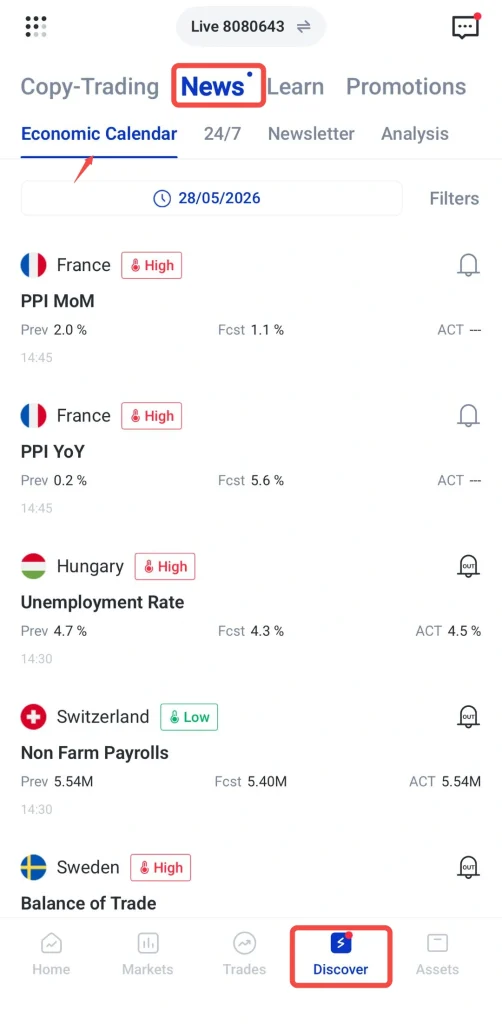
3. Set notifications for high-impact events to receive push alerts.
4. Review your positions before major announcements and adjust your trading plan where necessary.
Market Analysis from Trading Central
The VT Markets app provides market analysis powered by Trading Central, giving traders access to technical views on selected instruments. These updates may include chart patterns, price levels, trend direction, support and resistance areas, and possible market scenarios.
Trading Central analysis can be used as an additional reference when reviewing CFD markets. Traders may compare these third-party technical views with their own chart analysis before planning a trade, adjusting a position, or reviewing market conditions.
The analysis is provided by a third party and should not be treated as financial advice or a guaranteed trading signal. Traders should always review the market independently and consider their own risk tolerance before making trading decisions.
How to use market analysis on the VT Markets app:
1. Select a CFD instrument and open the chart window.
2. Click analysis
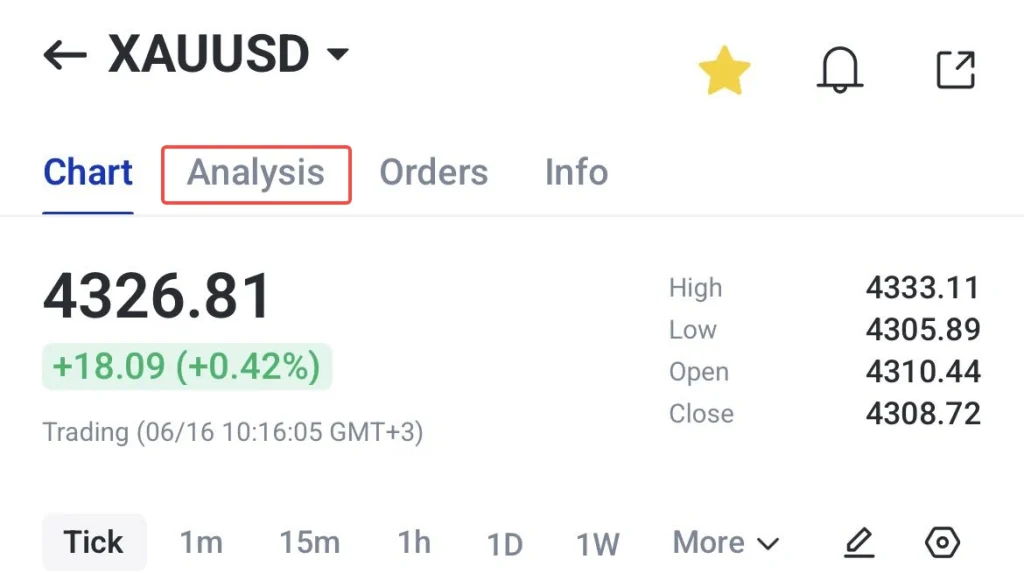
3. Choose a relevant analysis report or news update for the instrument you are reviewing.
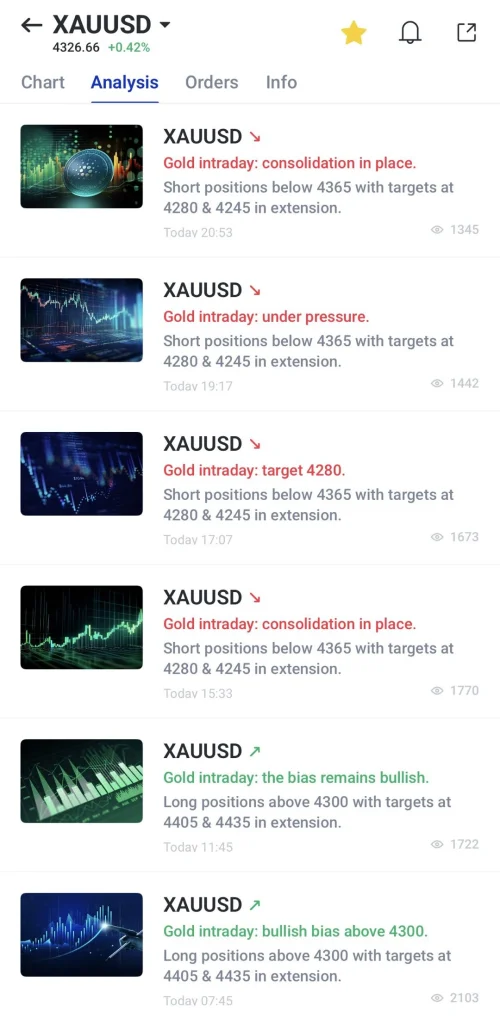
4. Review the chart, price levels, market view, and key notes provided in the report.
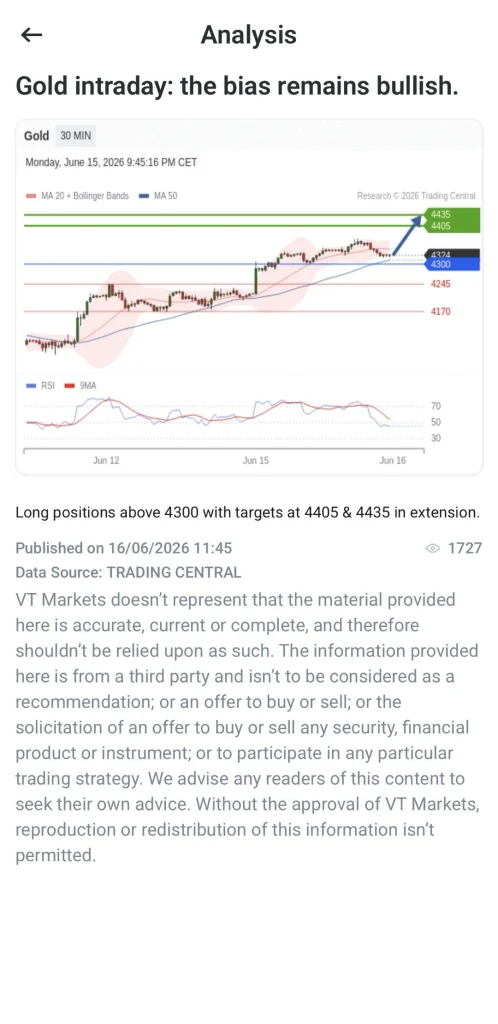
5. Use the analysis as an additional reference when planning trades or managing existing positions.
Technical Indicators
Technical indicators help traders assess price movement, momentum, trend direction, and volatility. In the VT Markets app, traders can apply commonly used indicators such as RSI, MACD, Bollinger Bands, and moving averages directly on the chart.
Each indicator can support a different part of the analysis process. Moving averages may help identify trend direction, RSI may help assess momentum, MACD may highlight changes in market strength, and Bollinger Bands may provide context on volatility.
How to use technical indicators on the VT Markets app:
1. Select a CFD instrument and open the chart window.
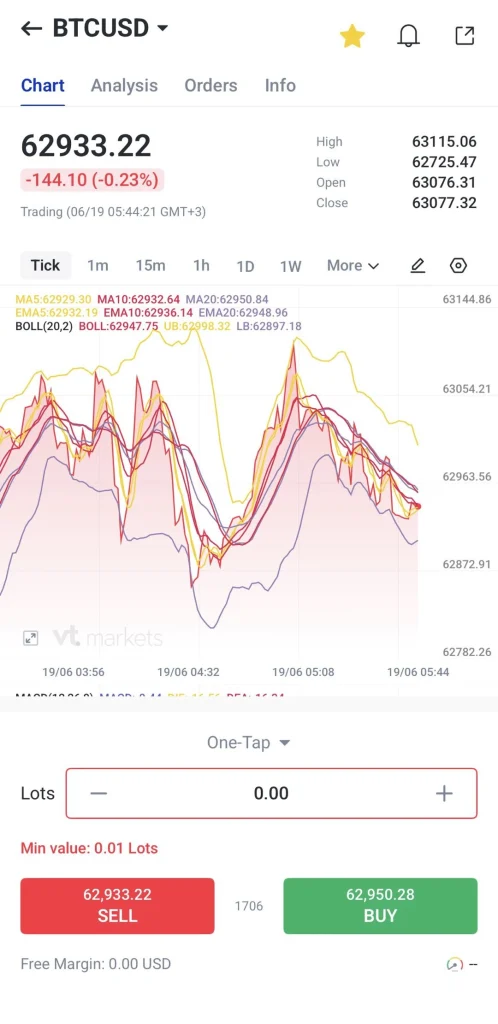
2. Click the button, tap the chart mode and choose Indicators
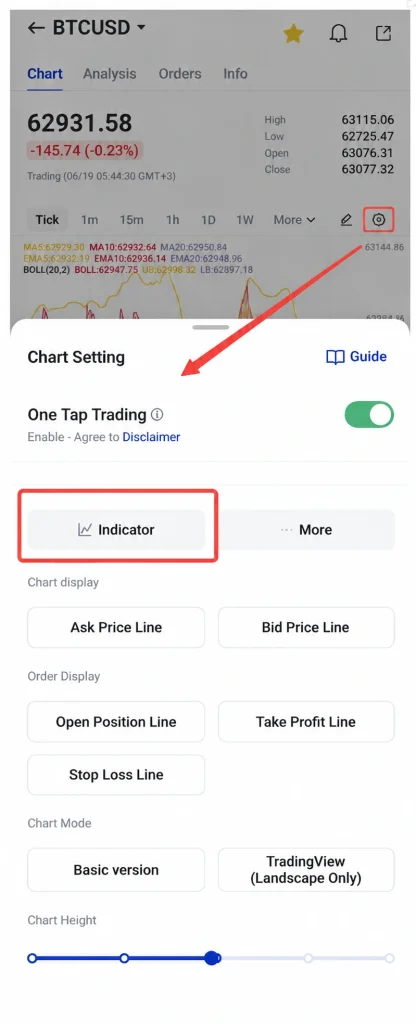
3. Choose the indicators you want to apply, such as RSI, MACD, Bollinger Bands, or moving averages.
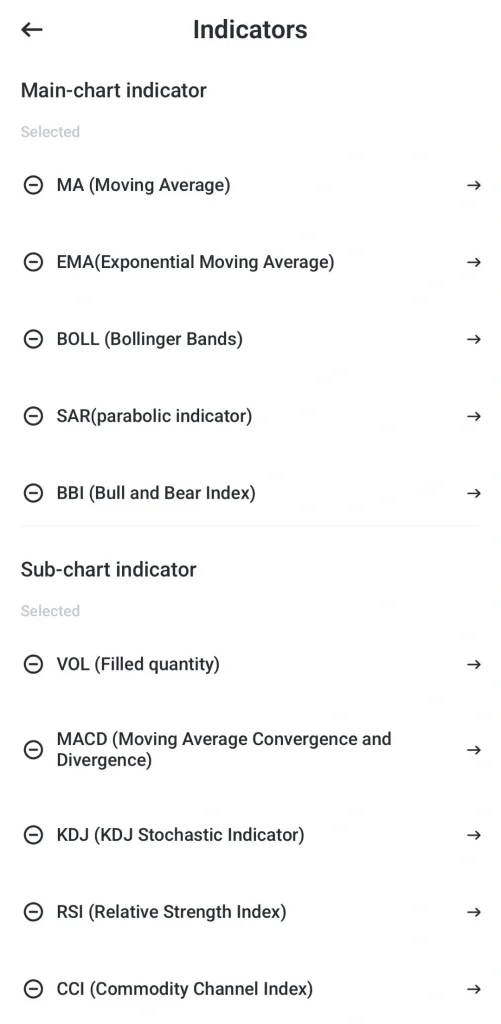
4. Adjust the settings, such as the period length, line colour, or line width.
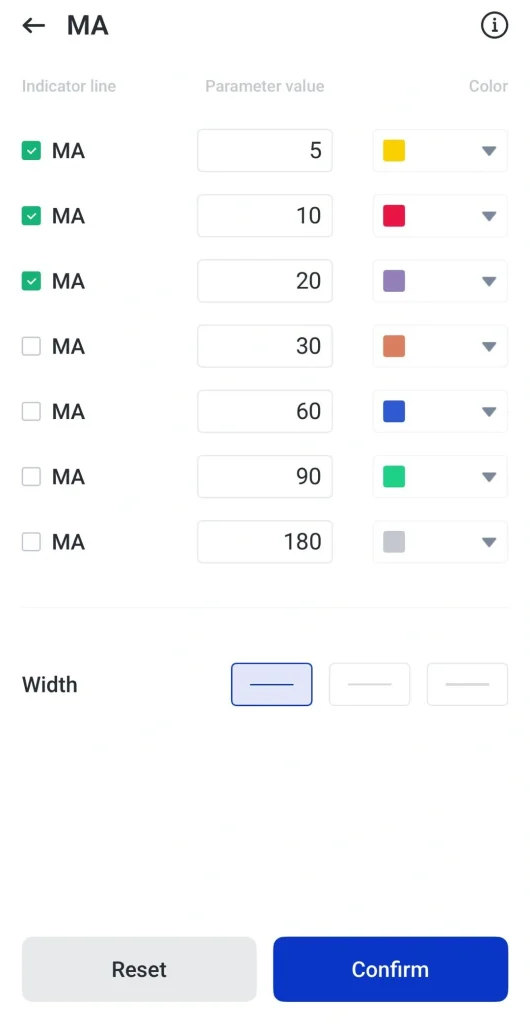
5. Click confirm and review the indicators together with price action to support your trading analysis.
Getting started with VT Markets App
The VT Markets app gives traders a structured way to set up their account, explore CFD markets, practise with virtual funds, and prepare for live trading. The process is straightforward, and the steps below show how traders can get started.
Download the VT Markets App
The app is available on iOS via the App Store and on Android via Play store. Once downloaded, open the app and follow the registration steps to create your trading account. You will need to provide the required personal details and complete the verification process before accessing full account features.
Start with a Demo Account
VT Markets demo account allows traders to practise using virtual funds in a simulated trading environment. This is useful for learning how to place orders, test indicators, explore chart tools, and understand how CFD instruments move without risking real capital.
Beginners can use the demo account to build platform familiarity, while experienced traders may use it to test new strategies or review app features before applying them to live market conditions.
Upgrade to a Live Account
Once traders are familiar with the app and the basic trading process, they can move from a demo account to a live account. A live account provides access to real market pricing, order execution, account funding, and the full trading experience across the VT Markets app and supported platforms.
Since CFDs are leveraged products, traders may choose to start with smaller position sizes while becoming familiar with live market conditions, margin requirements, and risk management settings.
Fund Your Account
VT Markets supports different deposit methods depending on country, account type, and available payment options. These may include local and international bank transfers, credit and debit cards, e-wallets such as Skrill or Neteller, UnionPay, mobile payment methods, and supported cryptocurrencies such as USDT, SOL, XRP, BTC, ETH, and USDC.
Traders can choose a suitable deposit method and follow the instructions in the app to add funds. VT Wallet is also available as an additional option for managing and transferring cryptocurrency within the app.
Personalise Your Trading Workspace
Traders can customise the app to suit their workflow. This may include creating watchlists, setting price alerts, applying technical indicators, reviewing chart layouts, and organising the CFD instruments they monitor most often.
A well-organised workspace helps traders access key markets, account information, and trading tools more efficiently during active market periods.
Take the Next Step with VT Markets
Open a live account with VT Markets today and access a wide range of CFD markets, including forex, commodities, indices, shares, ETFs, bonds, and cryptocurrencies, with powerful trading tools in one app.
Frequently Asked Questions
Is VT Markets a good CFD trading app?
Yes. VT Markets is a multi-asset CFD trading app that allows traders to access different CFD markets from mobile, including forex, commodities, indices, shares, ETFs, bonds, and cryptocurrencies. The app also provides charting tools, watchlists, one-tap trading, account management features, and market analysis tools to support CFD trading.
What CFD markets are available on VT Markets?
VT Markets provides access to a broad range of CFD instruments, including forex pairs, global indices, energies, precious metals, soft commodities, share CFDs, ETF CFDs, bond CFDs, and cryptocurrency CFDs. Product availability may vary depending on the client’s region, account type, and applicable entity.
Can I trade CFDs directly from the VT Markets app?
Yes. Traders can use the VT Markets app to monitor CFD markets, review charts, place trades, manage open positions, set alerts, and control account activity from mobile. The app also connects with supported platforms such as MetaTrader 4 (MT4), MetaTrader 5 (MT5), WebTrader, and TradingView for added flexibility.
Does VT Markets offer a demo account for CFD trading?
Yes. VT Markets offers demo accounts that allow traders to practise with virtual funds in a simulated trading environment. This helps beginners understand how CFD trading works and allows experienced traders to test strategies or review platform features before trading live.
What trading tools are available in the VT Markets app?
The VT Markets app includes watchlists, multi-timeframe charts, one-tap trading, TradingView chart integration, technical indicators, economic calendar alerts, and Trading Central analysis. These tools help traders review market conditions, plan trades, monitor positions, and manage risk across different CFD instruments.
Is CFD trading suitable for beginners?
CFD trading can be accessible to beginners, but it involves leverage and carries risk. New traders should understand margin, position sizing, stop-loss orders, and market volatility before trading live. A demo account can help traders practise and become familiar with the platform before using real funds.
Is VT Markets regulated?
Yes. VT Markets operates through regulated entities in multiple jurisdictions, including FSCA in South Africa, FSC in Mauritius, and CMA in the UAE under a Category 5 licence. Regulatory coverage, protections, and product availability may vary depending on the entity a client registers with.
How does VT Markets protect client funds?
VT Markets maintains client funds in segregated accounts, meaning client funds are kept separate from company operational funds, subject to applicable regulations and entity-specific terms. VT Markets also applies AML and KYC procedures as part of its operating framework. Eligible clients may have access to client fund insurance coverage of up to USD 1,000,000 per account, subject to policy terms, conditions, and exclusions.
How can I deposit and withdraw funds in the VT Markets app?
Deposits and withdrawals can be made through available payment methods depending on the client’s country, account type, and supported options. These may include bank transfers, credit and debit cards, e-wallets, mobile payment methods, UnionPay, and supported cryptocurrencies. VT Wallet is also available as an optional feature for managing and transferring cryptocurrency within the app.